FAQ
How does the real-time translation feature work during meetings?
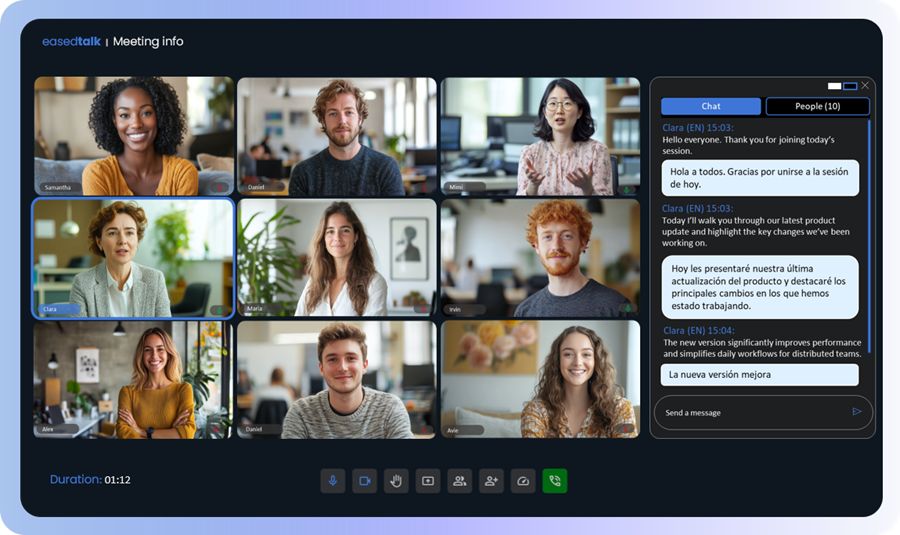
Upon joining the meeting, each participant simply selects their primary language. This is the language they will speak, and it is also the language in which they will receive the translated speech of other participants.
As a participant begins speaking, our system detects and recognizes their speech.
Once the final phrase is transcribed, the system instantly translates it into the chosen primary language for every other participant, ensuring everyone receives clear, accurate communication without delay.
This means there is no need to select one main conference language. Every participant is free to speak their native tongue simultaneously, breaking the limits of traditional one-way translation.
Which languages are supported for live translation and transcription?
Our service supports speech recognition and translation between 44 languages.
We provide comprehensive cross-translation among all supported languages. This means you are fully covered, regardless of the language combination in your meeting.
For a complete list of supported languages and regional dialects, please see the detailed list below:
Arabic (Bahrain), Arabic (Egypt), Arabic (Iraq), Arabic (Israel), Arabic (Jordan), Arabic (Kuwait), Arabic (Lebanon), Arabic (Mauritania), Arabic (Morocco), Arabic (Oman), Arabic (Qatar), Arabic (Saudi Arabia), Arabic (State of Palestine), Arabic (Tunisia), Arabic (United Arab Emirates), Arabic (Yemen), Bengali (Bangladesh), Bulgarian (Bulgaria), Chinese (Simplified, China), Chinese (Traditional, Taiwan), Chinese, Cantonese (Traditional Hong Kong), Czech (Czech Republic), Danish (Denmark), Dutch (Netherlands), English (Australia), English (India), English (United Kingdom), English (United States), Finnish (Finland), French (Canada), French (France), German (Germany), Hindi (India), Hungarian (Hungary), Indonesian (Indonesia), Italian (Italy), Japanese (Japan), Kannada (India), Khmer (Cambodia), Kinyarwanda (Rwanda), Korean (South Korea), Macedonian (North Macedonia), Malayalam (India), Marathi (India), Norwegian Bokmål (Norway), Polish (Poland), Portuguese (Brazil), Portuguese (Portugal), Romanian (Romania), Russian (Russia), Southern Sotho (South Africa), Spanish (Spain), Spanish (United States), Swati (Latin, South Africa), Swedish (Sweden), Tamil (India), Telugu (India), Thai (Thailand), Tsonga (South Africa), Tswana (Latin, South Africa), Turkish (Turkey), Ukrainian (Ukraine), Venda (South Africa), Vietnamese (Vietnam), Xhosa (South Africa), Arabic (Algeria)
How important is audio quality for accurate speech recognition?
Audio quality is highly important for achieving the best results with any streaming speech recognition system.
Our Service’s Advantage:
We ensure the audio signal is transmitted for recognition without any quality loss, provided the participant maintains a stable and high-quality internet connection. This guarantees the clearest possible input for our speech recognition system.
User Recommendations:
To maximize accuracy, we recommend that participants:
- Minimize external and background noise by speaking in a quiet environment.
- Speak in clear, complete sentences.
- Limit the use of abbreviations and highly specialized or unique jargon.
Can I use the service for business meetings and international teams?
Absolutely. Easedtalk is specifically designed to facilitate communication among participants who speak different languages.
Our solution is versatile and ideal for all scenarios, including:
- Global Business Meetings and International Teams.
- Private Consultations and One-on-One Interviews.
- Educational Settings, Training, and Tutoring.
We break down language barriers across every communication need.
Can multiple participants speak different languages in the same meeting?
Absolutely. Easedtalk was specifically engineered to support truly multilingual communication.
There is no need to select a single main conference language. Each participant is free to speak their own language and will instantly receive the translation of all other participants' speech. This means your global team can converse naturally and simultaneously, eliminating the limits of traditional one-way translation.
Do all meeting participants need to have the service installed?
No, installation of the service on participants’ computers is not required.
Ease of Access: Meetings take place directly within classic web browsers. This eliminates installation hassles and reduces friction for participants.
Browser Support: We currently support the most popular browsers, including Chrome and Edge, ensuring broad compatibility.
Is the service available as a mobile app?
Currently, there is no dedicated mobile application.
We are primarily focused on optimizing the experience within desktop browsers, even though the service is accessible via mobile browsers. This decision ensures the full functionality of key features like screen sharing and guarantees that the dedicated translation panel is clearly visible without compromising the view of participant cameras or shared presentations.
We believe this optimized desktop experience is crucial for the best quality translated meeting.
What level of accuracy can I expect from the transcription?
Currently, there are few providers that offer this complex functionality of streaming speech recognition. We utilize the industry’s most advanced provider of streaming speech recognition, ensuring one of the highest levels of quality for on-the-fly transcription available on the market.
We are actively developing an integration module to AI systems to further enhance accuracy by adapting the transcribed text based on the meeting’s historical context. This powerful new option will be available in the settings of new meetings soon. Please note that due to compliance and legal restrictions, we require explicit user consent to activate and use AI systems for context analysis.